 NapNap
One master stock, synced to every shop
Every product has one master record and one physical stock count in NapNap. New products are split across shops by share; second-hand items are cross-listed as one. A sale anywhere deducts or delists everywhere else.
- Master catalog
- Total stock
- Channel mapping

The single master record for every product (title, images, attributes, master SKU), independent of platform and shop. Maintain it once, list it to many shops.
Physical stock aggregated by master SKU, showing the share allocated to each shop. What a shop sees in its own stock manager is the share given to it here.
The platform product ID for every master product in every shop. When a sale lands anywhere, this is how the system finds the master product and deducts stock.
The desktop Inventory page, block by block
The left rail decides what scope you see; the main area decides how you see it. Click the rail or a number on the right to highlight that block.
ⓘ Master catalog:The single master record for every product (title, images, attributes, master SKU), independent of platform and shop. Maintain it once, list it to many shops.
Switch stock mode, allocate, check mapping, list
This block is clickable. It mirrors the real interaction of the desktop Inventory page.
Master catalog:The single master record for every product (title, images, attributes, master SKU), independent of platform and shop. Maintain it once, list it to many shops.
Unallocated stock and safety stock stay in NapNap and are not listed anywhere.
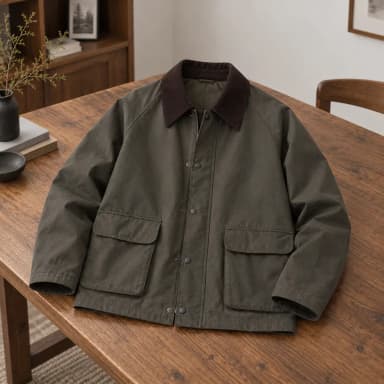
 Corduroy-collar Field Jacket · OliveNN-M-0201Apparel · general42


 Distressed Fold-over Boots · CoffeeNN-S-0112Footwear · general6
 Wave Ceramic Planter · Misty BlueNN-H-0031Home · general0
New products split by share, used items cross-listed as one
Every master product has a stock mode. Click the badge under the product name in the table to switch it, or select several and use Bulk set stock mode.
Master stock split across shops
A sale deducts that shop’s share; when a share runs out only that shop is delisted. Give a shop 0 and its live listing comes down after you save.
- Shopify10
- TikTok Shop12
- Amazon8
One stock shared by every platform
Usually a single unit shared by every platform and post; sell it anywhere and the rest come down. Several posts in the same shop count as the same unit too.
- Mercari · sold
- Poshmark · delisted
- Mercari post 2 · delisted
The browser extension syncs every 30 minutes
Products on second-hand platforms are synced by the NapNap browser extension. Hit Refresh all to sync every connected shop right away; when the extension isn’t running, the rail says the request hasn’t been carried out.
- Refresh one shop, or all of them at once
- Shows the last sync: just now / N minutes ago / never synced
- Sync shop stock pushes master stock out by the current allocation, overwriting each shop’s listed quantity
 Shopifydadada333.myshopify.com · Last synced 12 min ago3 items
 TikTok ShopNNS2 · Last synced 19 min ago3 items
 AmazonNapNap US · Last synced 26 min ago2 items
 MercariNapNap Mercari · Last synced 33 min ago0 items
Found 1 possible duplicate: the same item was listed on two platforms and imported as two master products (stock would be counted twice)
 Field jacketImported from Mercari · 1 in stockField jacket, like newImported from Poshmark · 1 in stock
One physical item, counted once
Importing from several platforms can leave the same item listed twice, creating two master products. NapNap surfaces these suspected duplicates for you to merge or dismiss.
Keep a buffer you never list
Safety stock is the quantity you deliberately keep off the shelves. It’s the margin that stops overselling when several channels order at once.
FAQ
Allocated splits master stock into per-shop shares, and a sale only deducts that shop’s share. Cross-listed shares one stock across every platform, so a sale anywhere delists the rest.
After you save, that shop’s live listing comes down on the next sync. Other shops are unaffected.
Whatever isn’t allocated, plus safety stock, stays in NapNap and is never listed — that’s the margin that stops overselling when several channels order at once.
After you confirm, the browser extension sends them one by one within a minute. The browser must be open and signed in; if the extension goes quiet for 15 minutes the status shows “unknown” and you can retry.
It means this master product has no matching platform product in that shop. Click Link it to pair them by hand, or use Resync all to pull the shop’s products again and rebuild the mapping.
Put stock in one place
Download the desktop app, connect your shops, and master products and stock gather here automatically.